Booking system services view

Booking system

Skip to technical description

What

A hotel property management system (PMS) built as several microservices.

Focus

Backend and architecture.

Status

Under development. This page covers both what is planned and what is implemented.

Why this stack

The technologies were chosen before the project started, to match what is used in the business today. The goal was to learn them in practice.

Shows

Service separation, an API gateway with rate limiting and role-based access, asynchronous messaging with Kafka, caching and locking, and containerised deployment.

About the project

What it is

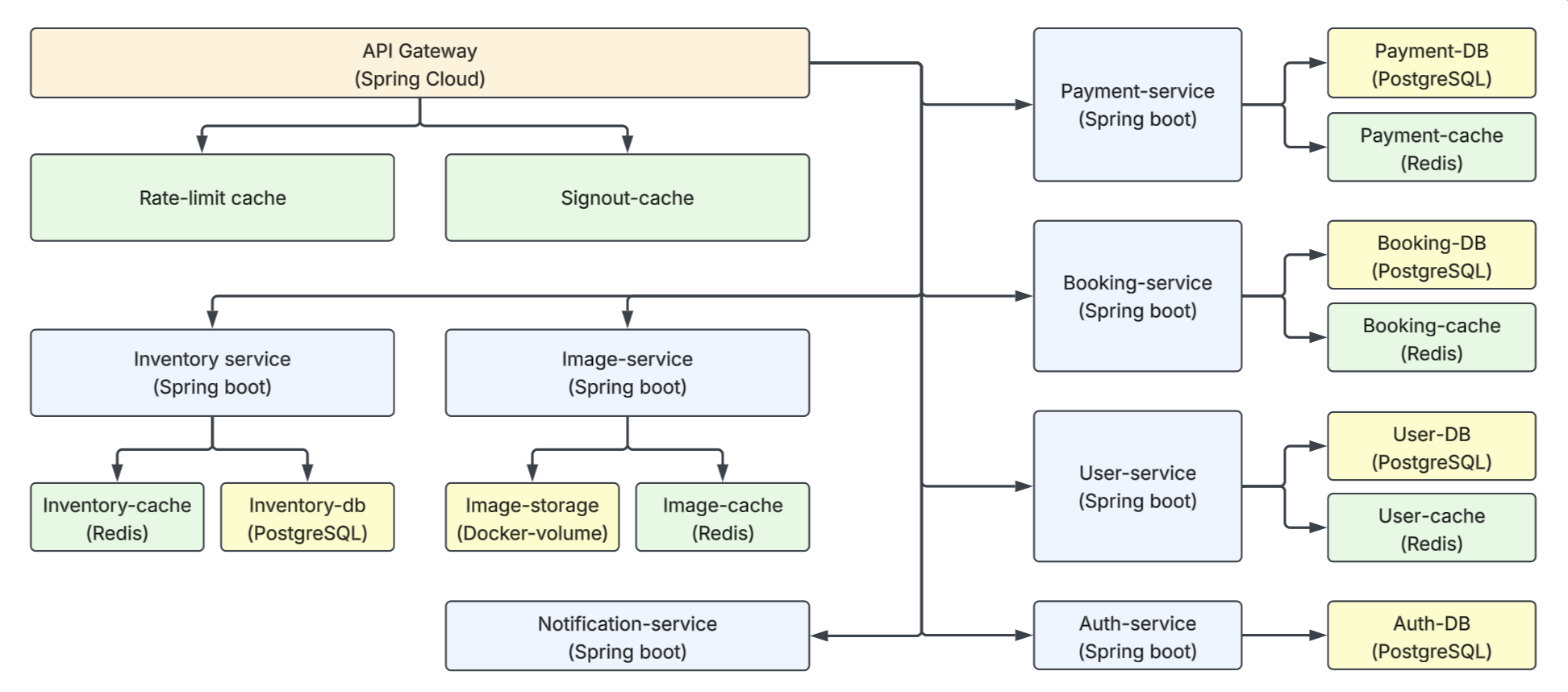
This project is a PMS (property management system) intended for a hotel. It is built as several microservices, each with its own area of responsibility, such as inventory, booking, payment and authorization. It is mainly a backend project with a focus on architecture.

The project is still under development and will be updated continuously, so this description includes both what is planned and what is already implemented.

General overview of the architecture

What it does

Among other things, the project intends to let customers create bookings, view previous ones and cancel them. It also intends to let employees handle different aspects necessary for operations, such as registering new rooms, viewing bookings and setting rooms as unavailable.

Who uses it

The system has five user groups, of which four require registration: unregistered users, registered customers, employees, managers and owners. The user group you belong to determines which functions you can use.

Goals and scope

The main goals were to learn more about different architectures, technologies, authorization levels and languages. Validation and sanitization of input, and potential edge cases, therefore have less focus in this project, though they are not left out.

Roles and contributions

  • All roles and contributions for the project
General overview of the architecture
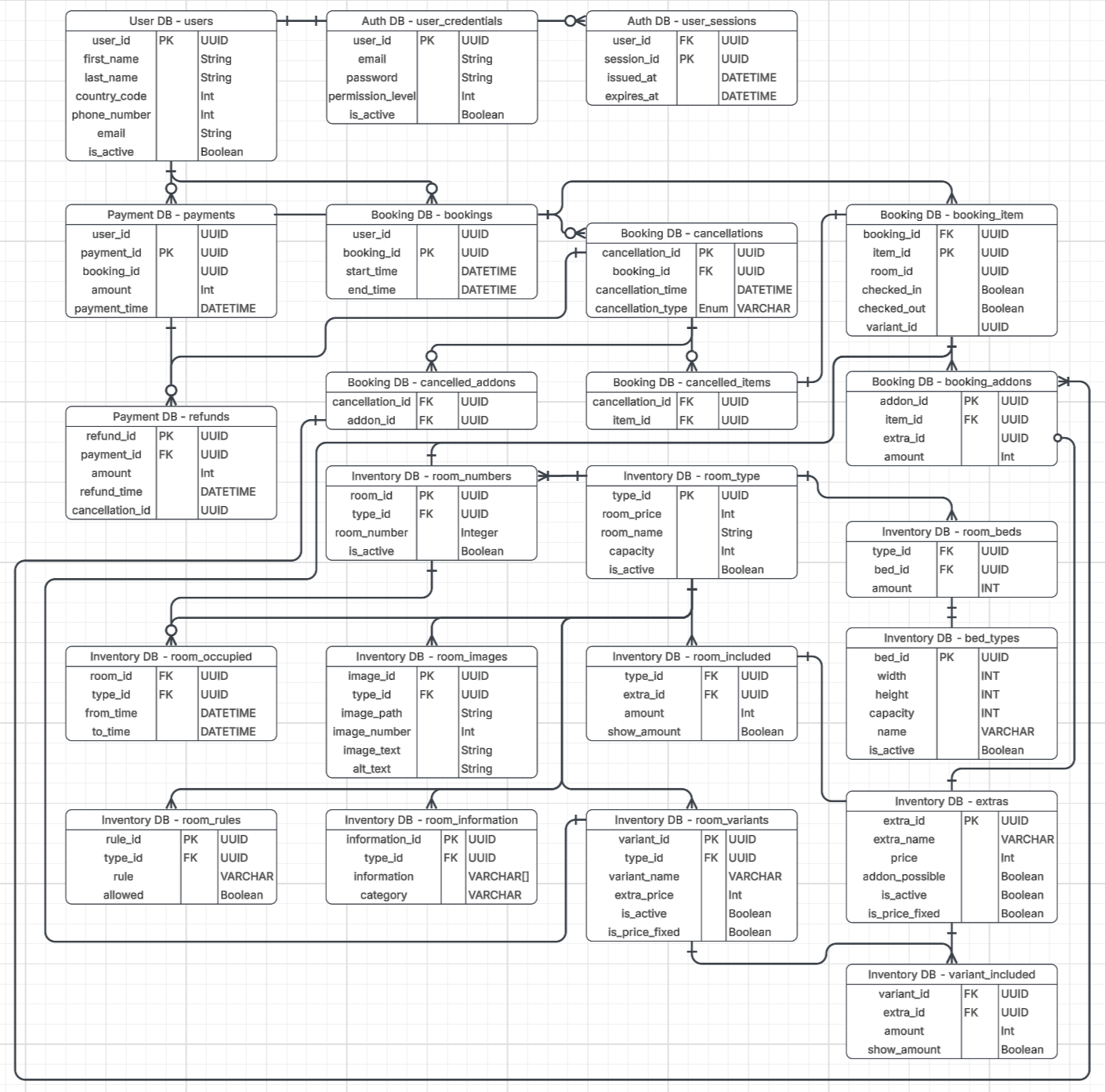
General overview of the database system

1 / 2

Languages and technologies

The stack was chosen before the project started, to match what is used in the business today. The goal was to learn these technologies in practice.

Java

The language the services are written in.

Spring Boot

The framework the services are built with.

Spring Cloud

The API gateway and service setup.

Redis

Caches for rate limiting, invalidated tokens, and booking and inventory locks.

Docker

Every service, database and cache runs in its own container.

PostgreSQL

A database for each service.

Kafka

Asynchronous events between services, for example from auth to user on registration.

JWT

Access tokens, verified at the gateway.

Services

Entry point

API gateway

The only external entry point. Verifies, rate limits, stops or forwards requests, and handles authentication and role-based authorization.

Stores
Two caches: rate limiting, and invalidated access tokens.
Reached how
From outside. The only service reachable from outside.

Users

Auth service

Registration, login, logout, sessions and issuing tokens.

Stores
Auth database (user_id, email, password, role) and sessions.
Reached how
Through the gateway. Sends user data to the user service over Kafka.

Users

User service

User information not needed for authorization, such as name and contact details. Makes it available to employees.

Stores
User database.
Reached how
Through the gateway. Receives data from the auth service over Kafka.

Booking flow

Inventory service

Room types, availability, finding bookable options and setting rooms as unavailable. Stores image-related data, such as which room an image belongs to.

Stores
Inventory database and a cache used to lock items.
Reached how
Through the gateway. Called by the booking service over HTTP. Receives Kafka events from booking.

Booking flow

Booking service

Creating, viewing and cancelling bookings.

Stores
Booking database and a cache (the "shopping cart" and the payment lock).
Reached how
Through the gateway. Calls inventory and payment over HTTP. Sends Kafka events to inventory.

Booking flow

Payment service

Payment data and refunds.

Stores
Payment database, and cache for locking.
Reached how
Internal only. Called by the booking service over HTTP.

Supporting

Image service

Storing images and making them available quickly.

Stores
A docker volume for the image files.
Reached how
The upload endpoint is internal only and is used via the inventory service.

Supporting

Notification service

Sends email notifications to users, for example when someone registers an account, or when a booking is made or cancelled.

Stores
No cache. A database for sent emails is being considered, so the hotel can keep track of them and verify things like what was sent.
Reached how
Through Kafka.

Technical

General architecture

The project uses different services, each with its own area of responsibility. Every individual service, cache and database is dockerized and accessible via an API gateway. Each service has its own storage, either as a cache, database or docker volume. This makes the services work independently of each other, meaning the uptime of one service has minimal impact on the others.

General overview of the architecture

Access and communication

Only the API gateway is accessible from outside the local docker network, and all requests go through it. It is responsible for verifying, stopping, and forwarding requests to the right service. Services can communicate with each other on the local network, where Kafka is used between services when a response is not necessary for the sender.

Dockerization

All services, databases, and caches are in separate containers. This is to be able to scale the system, and separate services, as needed. Docker is also used to run everything in the same environment, so that it does not depend on the specifications of the machine running the project.

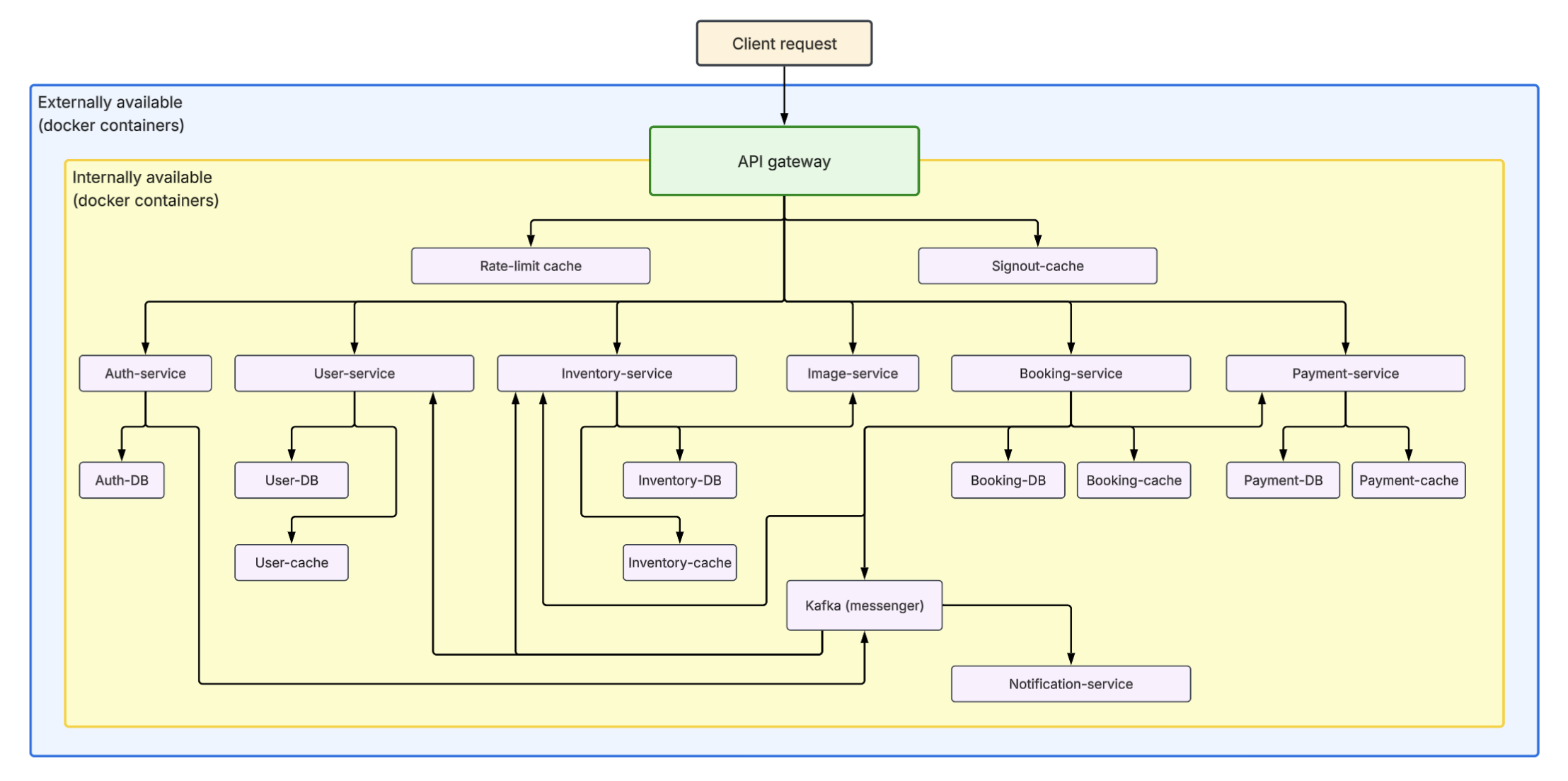
Visual explanation of the docker setup.

Internal and external access

It also allows services to be on a local network, rather than being accessible outside the gateway. This way you can control which functions and services should be available externally and internally, where it is specified in the API gateway exactly what is available externally. An example of this is the image service. It has functions for uploading and making images available, but the endpoint for uploading images is only available internally. Therefore only other services can contact that endpoint.

Reading the diagram

The image shows a general explanation of docker containers and setup. All light purple boxes, and the green one for the gateway, are separate docker containers. In addition, the image service has its own volume for storing images. Everything in the yellow box is only available internally on the local network, while the gateway is available externally, and can contact services internally. The image also shows a very simplified explanation of how different services communicate with each other, either via http requests, or by using Kafka.

API Gateway

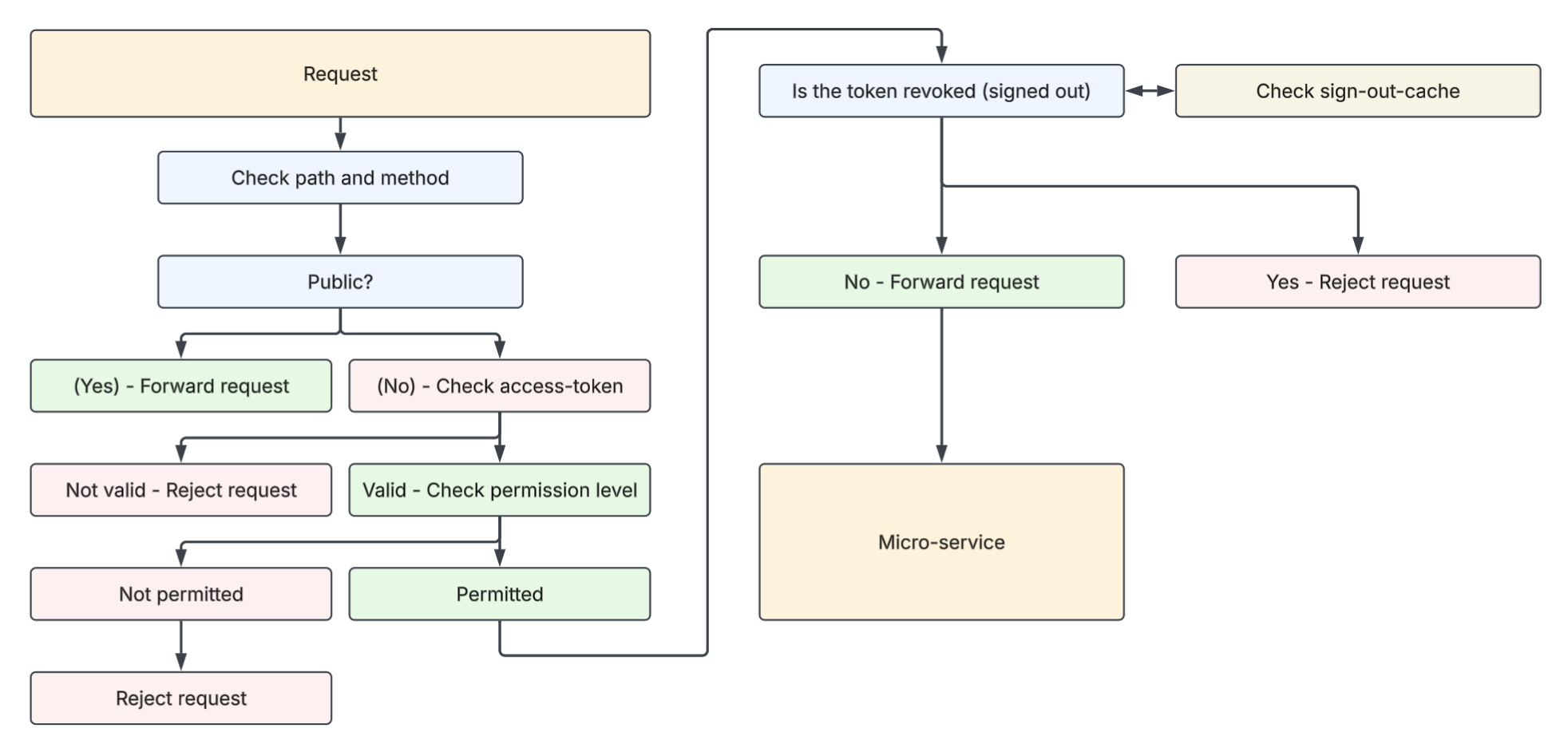
The gateway is responsible for verifying, limiting, stopping, and forwarding requests to the relevant service. It does this through rate limiting, as well as authentication and authorization by verifying the access token.

General overview of the API gateway

User groups and permissions

It distinguishes between 5 user groups, where which functions a user is allowed depends on which group they are in. Permissions depend on both method and path, meaning a path can have different permissions depending on the method. If the user does not have the necessary permissions, the request is rejected instead of being forwarded to the service.

Invalidating access tokens

The API gateway also uses two caches, one for rate limiting and one for invalidating access tokens. If a user logs out, this is stored in the cache until the token expires. When a request is sent and it has an access token, it is checked whether it has been invalidated before the request is forwarded.

Why the gateway keeps its own cache

This is done because the gateway does not have access to the auth service's database, where sessions are stored. If a user logs out, the refresh token is removed from cookies, and the session is removed from the database. But if the user keeps the access token, they can still use it until it expires. This was to prevent invalidated access tokens from being used further, without depending on the auth service.

Communication between services

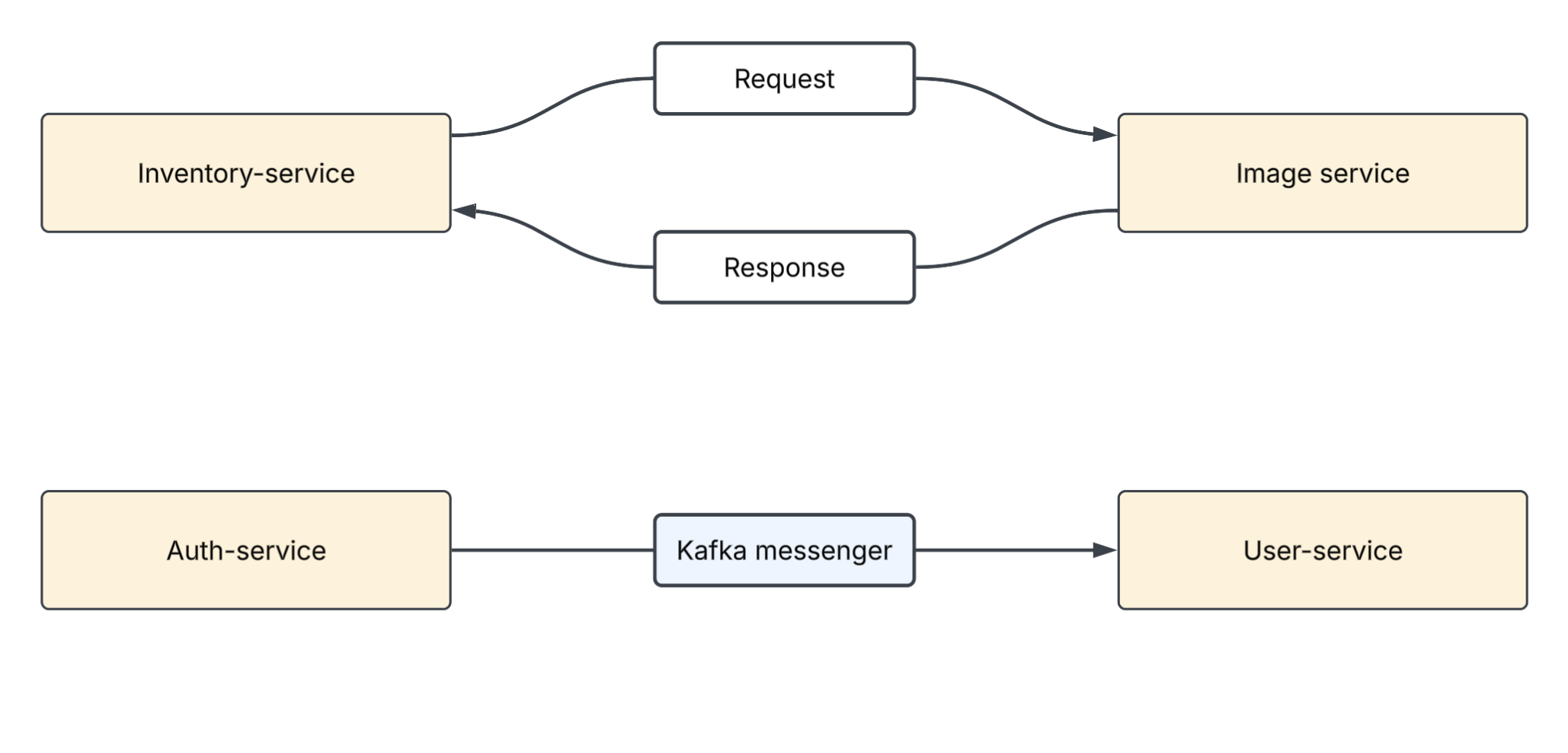
Communication between services is done both with Kafka and by sending requests on the local docker network. Kafka is mainly used when the sender does not depend on a response, while http requests are made when a response is necessary or when it is more suitable for the data being sent.

Overview of communication between the services

HTTP: uploading images

An example of the latter is when images are uploaded. The image service is responsible for images, both storing them and making them available. But the inventory service is responsible for storing related database data, such as which room it belongs to and the image text. There are mainly three reasons for this:

  1. The image service should be able to deliver the image quickly without having to check the database for the right file.
  2. If you could upload images directly to the image service, not via the inventory service, and it held the data on which room it belongs to, the image service could not itself check whether the room actually exists.
  3. If the image service stops working, and it holds image-related information in its database, users will not get the data necessary to view inventory in the browser. With the current setup this will be possible, with only the images missing.

Kafka: registering a user

Kafka is used in other settings, such as when a user registers. The auth service is responsible for functionality such as registering, logging in, and logging out. Meanwhile, the user service should hold user information unrelated to authorization, such as name and contact information. Kafka is used here to send user-related information from the auth service to the user service. The auth service is also not dependent on the user service storing the information at the same time as it is sent, and therefore does not need a response to complete its task.

Kafka: notifications

The notification service is also communicated with using Kafka. It is meant to send email notifications to users, for example when someone registers an account, or when a booking is made or cancelled.

Design - Database

The image shows the planned setup of the database. All tables that will be used are included, and which service it belongs to is written at the top of each of them. The system is designed as a whole to make all the functionality planned for implementation possible.

General overview of the database system

One database per service

Each database holds data relative to the area of responsibility of its corresponding service. While it should work separately, minimizing redundancy was also a priority. Therefore, duplication of data between databases is minimized, and ids are referenced instead. This is also to separate areas of responsibility; the booking service is responsible for what concerns booking, not for storing or handling data regarding inventory.

The trade-off

While this helps split the services from each other, it also means that some functionality depends more on other services, compared to being able to function completely individually. However, the current system allows a service to go down without the system as a whole ceasing to function, which was one of the purposes of the project.

Auth- and User-service

The auth and user services both have databases that store user-related information, some of it overlapping, but they have different purposes. The main difference is that the services have different areas of responsibility.

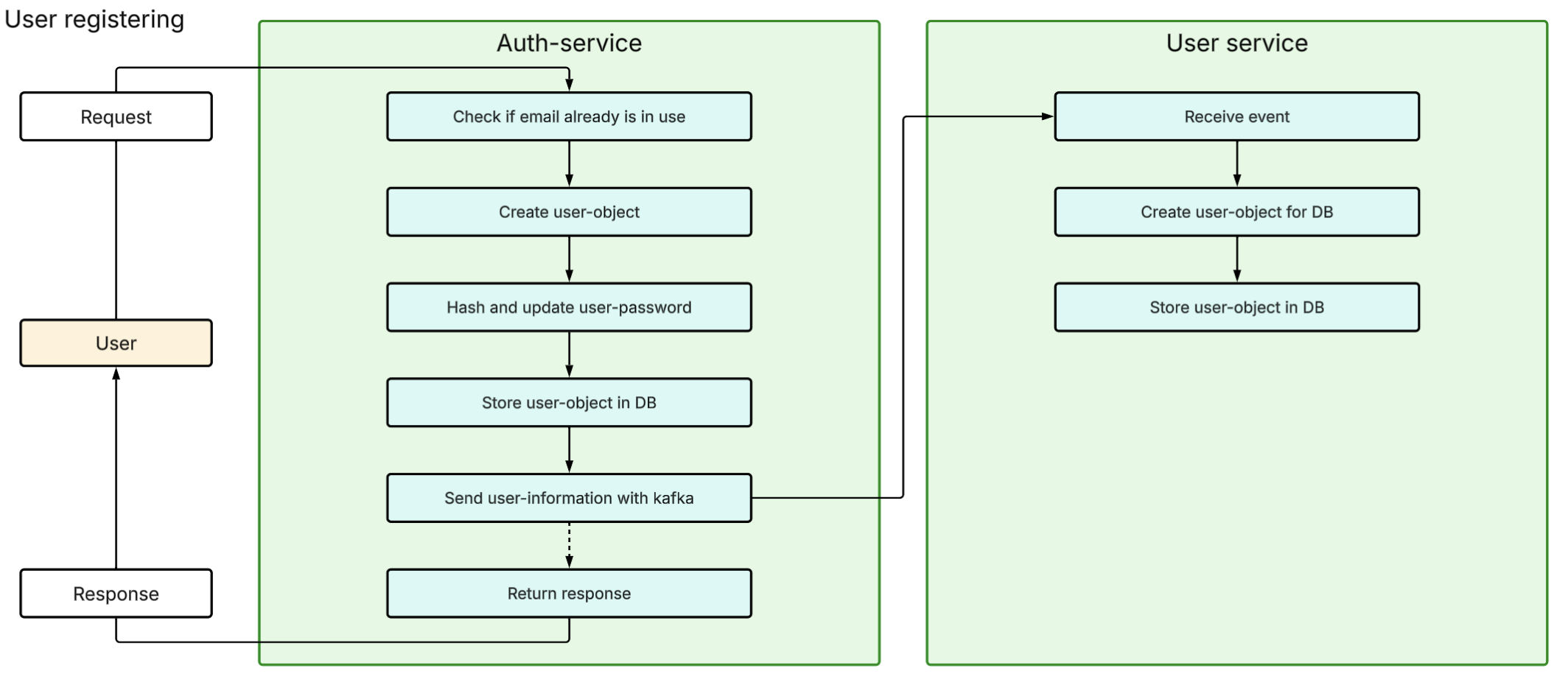
Simplified visualization of communication between the auth and user service.

The auth service

The auth service is responsible for functions such as registration, logging in, logging out, storing sessions and issuing tokens. It also stores sessions and data necessary for authorization and authentication through issuing new access tokens.

The user service

The user service is responsible for functions that are user-related, such as making contact information available to employees, and other personal information necessary for the hotel. It mainly holds user information that is not necessary for authorization and authentication.

Registering a user

The services also interact somewhat; when a user is registered, auth-related information is stored in the auth database, and personal data is sent to the user service with Kafka to be stored there. The fact that data is sent from the auth service to the user service also helps keep it consistent, since the auth service creates the new user id, which is sent and stored in the user service. The image shows a simplified explanation of the process when a user registers.

Payment- and booking-service

The booking service and payment service are both part of the process of making the actual booking. While the booking service stores the information on what is booked, the payment service stores data that directly concerns payment. The payment service then uses the id from the booking service to identify which booking it is related to. The payment service also holds data related to refunds, but not cancellation. It is mainly the booking service that is used, and the payment service is only used by the booking service and is only available internally.

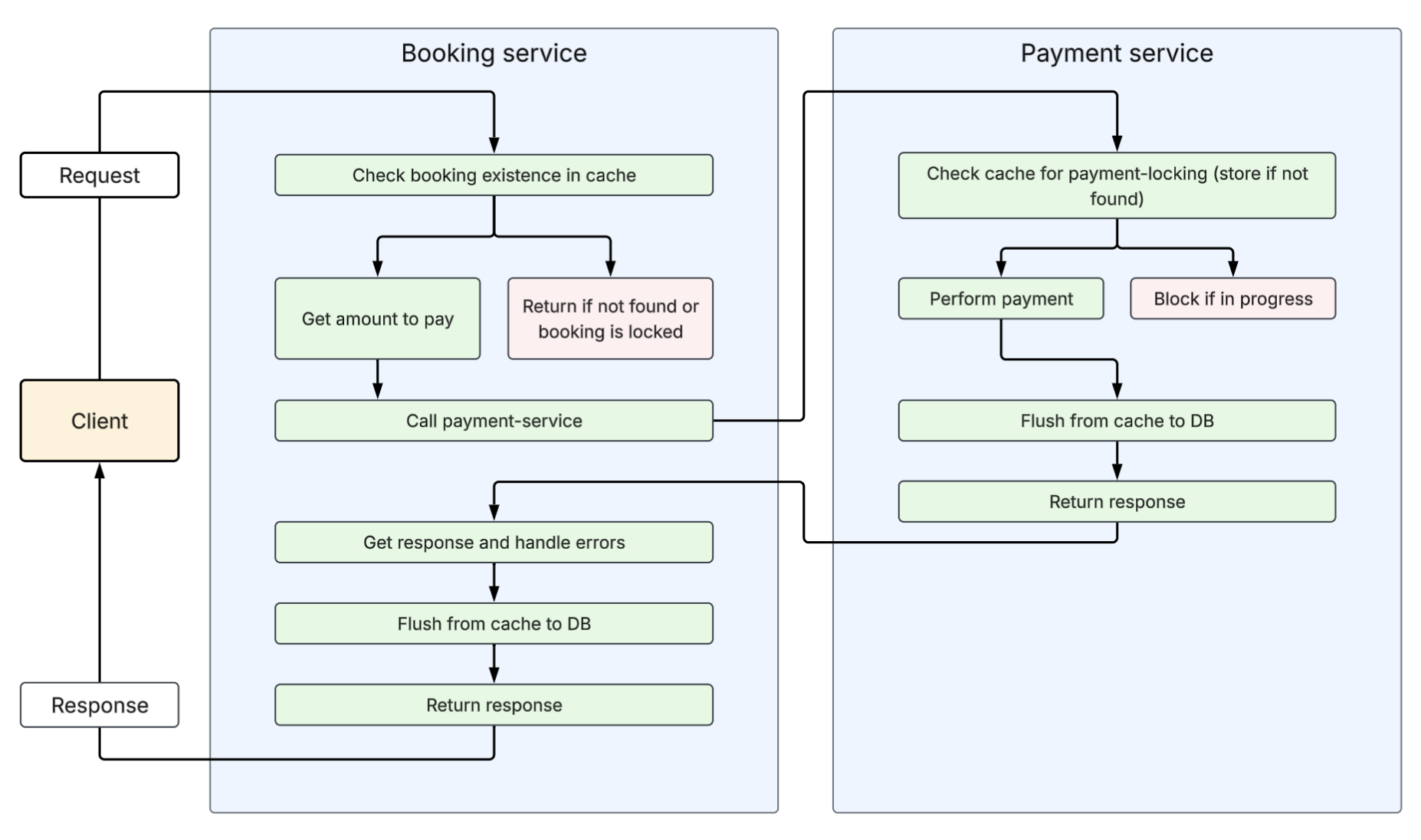
Simplified visual explanation of communication between the booking and payment service

How a payment works

The booking service does not use Kafka to communicate with the payment service, as a response is necessary to complete the booking; if the payment does not go through, the booking should not be made. To prevent the same payment from being made, for example by 2 requests being made for the same booking, a cache is used to lock it to "in progress". When the payment is completed in the payment service, the booking service gets a response, and flushes the booking from the cache to the database. The request thus goes booking -> payment -> booking.

Why booking calls payment, not the other way around

The reason it does not go payment -> booking, and possibly use Kafka to tell the booking service that payment has been completed, is that the booking service must confirm both the sum and the booking before it is paid. Otherwise it makes it possible to pay less than the actual price, and for the payment to use an invalid id that does not correspond to anything in the booking service.

Not shown in the diagram

The image shows a simplified visual explanation. However, some factors and scenarios are not included in the visualization, such as checking whether the room being booked is available before it is booked/reserved.

Booking- and Inventory-service

The booking and inventory services have a lot of interaction, and are to some extent dependent on each other. At the same time, they have clearly different areas of responsibility, which is why they are not under the same service. They are also split to make each service more manageable to work with, and so that the uptime of one has minimal impact on the other. Splitting them into different services also makes it possible to work on one service without modifying another.

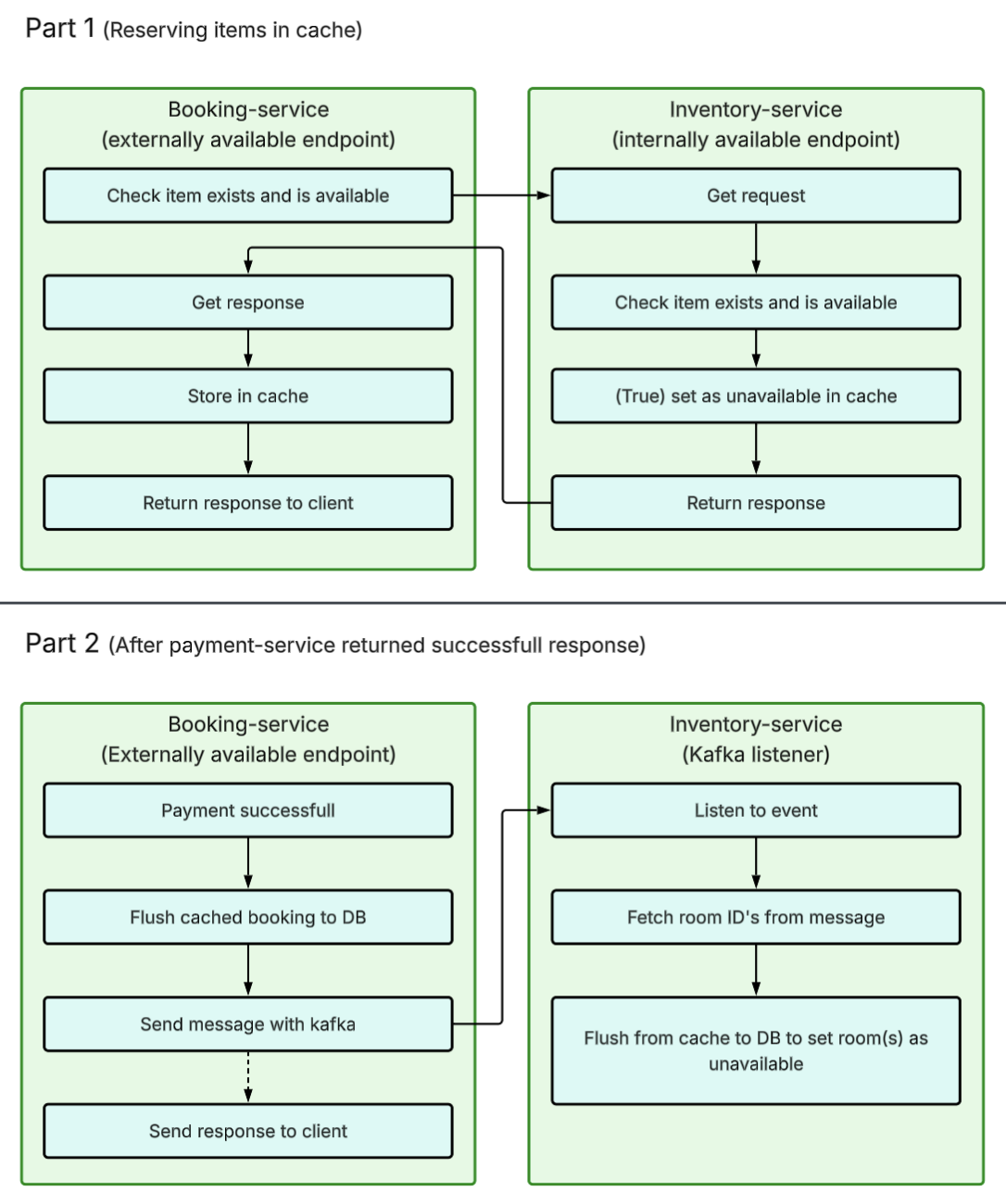
Simplified visualization of the interaction between the booking and inventory service

Responsibilities

The booking service is responsible for data and functionality that is directly related to creating, viewing, and cancelling bookings. The inventory service is responsible for data and functions that are directly related to the inventory. These are things like storing different types of rooms and the number of rooms available, and functionality such as finding available booking options and, for employees, setting rooms as unavailable.

Referencing ids

The booking service does not duplicate data from inventory, but rather references ids from the inventory service. While this makes the booking service more dependent on the inventory service, it minimizes the amount of data stored, and helps keep it consistent between services. While keeping services as independent of each other as possible is a priority, it is considered appropriate in this case.

Holding and confirming a booking

The image shows a simplified visualization of the interaction between the booking and inventory service.

In part 1, the booking service confirms with the inventory service that the item exists and is available by sending an http request. Inventory checks, and locks it in the cache to prevent others from booking the same item. Inventory sends a response to booking, which then puts it in the cache (in effect a "shopping cart").

In part 2, the booking service receives confirmation that payment has been made, whereby the cache (shopping cart) is flushed to the database, and an event is sent with Kafka that the inventory service receives. Inventory then flushes the cache to the DB to permanently set the items as unavailable.

Considerations and choices

These are assessments and choices that were made earlier in the project process. This means that they may differ from current choices and results. However, they were part of building the foundation for what the project has, and will become.

Identifying users across services

Problem: With a separate database per service, how do you identify which users have which booking or payment? Decision: Carry user_id between services. Fields holding ids used in several databases are required, but not generated automatically. Show full reasoning Hide full reasoning

Trade-off: More manual handling and ids sent between services, instead of the full power of relational databases. In return: better separation of responsibility, and a more modular system that mostly keeps working if one service or database goes down.

When each microservice has its own database, how do you identify which users have which booking/payment? The user data lives in the auth database, and user_id has no relational meaning outside of it, the way it would have in one shared relational database. Still, user_id can be carried and handled by the system as a whole. This is just a symptom of separate databases per service preventing the use of the "full power" of relational databases, which requires more manual handling and ids being sent between services. In return, it gives better separation of responsibility and a more modular system, where the rest still functions fully if one service/db goes down. The databases must therefore be well planned to reduce redundancy and optimize speed. Database fields with ids used in several databases are set as required, but are not generated automatically.

Basic user information

Problem: If a front-end is added later, which service should deliver a user's name and basic information? Decision: A separate user service for non-auth user data (name, phone number, address). The auth database only holds user_id, email, password and role. Show full reasoning Hide full reasoning

Trade-off: An extra service and database, which can become overcomplicated. In return: it respects separation of responsibility, and gives a foundation for later changes to information that is not auth-related.

If a front-end is implemented later, it should show the user's name and some basic information, and which service should deliver that in that case? The auth service is a poor fit, since its responsibility is auth, but a separate service with its own database just for this can become overcomplicated. In return, it would provide a foundation for users to later change information that is not auth-related. Changing auth-related information, such as email, can on the other hand get messy, since it requires updates in several databases and services. It depends on the scope and focus of the project. I have chosen to create a user service for user-related functions that are not auth, for example employees being able to see customers' names and contact information. Then the auth database only needs user_id, email, password and role (user/admin), while name, phone number, address etc. are in the user service's own database. This respects separation of responsibility, since such information is not relevant for auth.

Caching and updating the db

Problem: When a post request is cached, should the db be updated first, or the cache? Decision: No single method fits everywhere. Reads use cache-aside. Writes mainly use write-through, sometimes with distributed locking. Show full reasoning Hide full reasoning

Trade-off: Updating the db first is slower but safer. Updating the cache first is faster, but the client may get a success response even if the db update then fails.

How should caching and updating the db be done? When a post request is to be cached, should the db be updated first and then the cache, or should the cache be updated first, the response sent to the client, and the db updated afterwards? Updating the db first takes longer, but is safer. Updating the cache first is faster, but more vulnerable: If the db update fails, the client has already received a success response, even though the response should have been an error. Ideally you want both speed and accuracy, but it is not certain both are possible. Caching must be assessed against several scenarios, both reading and writing, within and across microservices, so a single method does not fit everywhere. Fast response must go together with robustness and few points of failure. For reading, "cache aside" is used: The cache is checked first, then the db, and data is put in the cache when the db is read. For writing, it depends on the task, since some caching requires locking (bookings), while others concern updates. Mainly write-through is used, and sometimes distributed locking: It is written to the cache first, and the process is completed before the data is passed on from the cache to the db. That way the system can check that the write to the db went correctly before it responds to the client.

Reserving a booking

Problem: How do you hold a room for a user in the middle of a booking, so that others cannot book it but this user still can? Decision: Booking has two steps, reservation and payment. The booking service creates a booking_id and stores it in its cache with user_id, and asks the inventory service to reserve the room in its cache with that booking_id. Show full reasoning Hide full reasoning

Trade-off: If a db goes down, especially booking, data users need to check in is lost. Rebuilding it from the other databases (a kind of "RAID") is possible, but needs extra data and may not respect separation of responsibility as well.

What is the best way to reserve a room while a user is in the middle of a booking, so that it is not available to others, but still is for this user? If you store the reservation in the inventory service's cache, it has to store extra data that is somewhat redundant, but the cache must show that the room is unavailable anyway, so that others do not try to book the same one. The booking service's cache is more relevant, but is primarily used to lock bookings and prevent double payment, so it can come into conflict. An alternative is an endpoint that only reserves: the booking service creates a booking_id, stores it in its cache with user_id, and asks the inventory service to reserve the room in its cache with booking_id. Booking thus has two steps: reservation and payment. Changes before payment are updated in both caches. At payment, booking_id is retrieved via user_id, the booking is locked against double payment, and data is retrieved from the inventory service. When the payment is completed, data is moved from the cache to the db in the booking and inventory services, and the payment is stored in the payment db with booking_id and user_id. If a db goes down, especially booking, you lose data users need to check in. A system that puts together the lost information from the other databases (a kind of "RAID") is possible, but requires extra data and perhaps does not respect separation of responsibility as well.

Different booking variants

Problem: How can the same room type be offered in several variants, for example with or without breakfast, at different prices? Decision: Store variants as children of the room type. The room type holds shared data (base price, occupancy), and each variant holds an additional price and what it includes. Managers can create, change and deactivate variants. Show full reasoning Hide full reasoning

Trade-off: Needs two new tables in the inventory db. Variants tied to bookings cannot be deleted, only deactivated.

The hotel currently cannot offer multiple options for the same room type, for example with or without breakfast, with different prices. Separate room types for each variant can create problems with availability, and making it an add-on forces users to add something that could just as well have been part of the room. Therefore variants should be stored as "children" of the room type: the room type has data that applies to all variants, such as base price and occupancy, while each variant has an additional price and what it includes. This requires two new tables in the inventory db, but linking them only with a variant number creates more mess and is harder to handle. Managers must be able to create, change and deactivate variants, and since they are tied to bookings they cannot be deleted. The booking item must also know which variant it concerns, so that employees and users see what the booking includes. This requires no new table, since each item is one room, and one room can only be one variant. A table is therefore created for room variants and a table that links what each variant includes, for example breakfast or extended refund. The variant's id (PK) is added to the booking item table, and managers get three endpoints: create, change and deactivate. Deactivation determines whether the variant can be booked, without removing data needed for existing bookings.

Deleting booking options

Problem: How can a booking option (room, accommodation, bed etc.) be removed when there may be bookings with it? Decision: Do not delete. Set "is_active: false", and only delete when no future bookings are linked to it. Show full reasoning Hide full reasoning

Trade-off: Deleting would break relations within and between services, for example a payment no longer linked to an actual user, or a room type that no longer exists for future bookings.

If a booking option (room, accommodation, bed etc.) is deleted while there are bookings with it, you lose necessary information. How can something be removed from the inventory database or as a bookable option when there may be bookings with it? Deletion can create problems with relations within and between services, for example a payment no longer being linked to an actual user. If a room type is deleted, there are also problems for future bookings, since the room type no longer exists. It is therefore more relevant to use flags, such as "is_active", so that the system stays correctly linked. Elements are therefore not deleted directly, but set to "is_active: false", and are only deleted when no future bookings are linked to them.